
Authoring Contracts in Microsoft Word
Designing a solution that lets enterprise users create contracts (offer letters, NDAs, SOWs, etc) with speed and accuracy using Smart templates that the legal teams setup in their organisations

Complete walkthrough
In house demo video created with the team on what the Agreements experience is like
My role
There are four key user journeys in the project,
I was tasked to investigate and design solutions to the 2nd (document creation) and 3rd (Approval) phases
The team
3 designers, 2 teams (4 partner stakeholders), 10 Developers, 2 Product managers, 1 researcher, 1 Content designer, Accessibility experts.
Duration
5 months

01
Set up smart document templates & business approved clauses

03
Send document for review and approval

02
Generate documents using templates

04
Send document for signatures
Outcome
01
Designed document authoring and Approval experience that was
co-designed and tested with customer 0 and implemented in the MVP
02
Designed a product framework in Word by closely Collaborating with designers, Product managers & Engineering across Word and Syntex
Identifying user roles, jobs and issues
For better context
let's look at what a
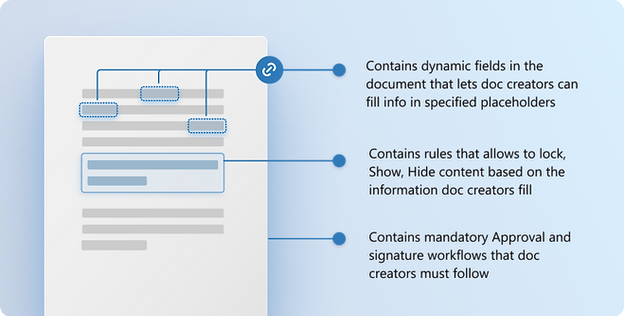
Smart template does
Users and jobs involved in document creation

Kristien
Template creator
Para legal
-
Create templates
-
Defines who can use the template
-
Defines all conditions within template
-
Defines mandatory workflows within the template that documents that use the template should follow

Luke
Document creator
Business admin, owner or process manager
-
Find and use templates that they have access to
-
Fill the details within the document
-
Send the document for approval
-
Send the document for e signature

Eric
Document approver
Senior stakeholder
-
View document and its details
-
Review and respond to the approval request
Problems with current process

Dependency on paralegals during document creation
Users are forced to depend on SMEs to assist with authoring documents as this involves multiple steps that are specific to the type of document being created.

High learning time for paralegals to set up approvals in templates
Heavy workflow tools like power BI or APIs to setup approvals required time and energy to learn and implement
Validating hypothesis and defining direction
Considerations from compete study and Word user mental modal
Most tasks in word are not structured however contract authoring is structured and have steps to follow to complete. the following considerations were set to understand what is most important at different phases of authoring.
Important for creating documents
01
Progress and sense of completion
User should know the status of generating the document
02
Guidance on next steps
Users can easily identify and navigate to the next step to take while creating the document and easily get answers to question that they are blocked on
03
Align with Word way of working
Users can should have an ability to either do the task inline or via the side panel
Important for approvals
01
Setup using plain language
The approval rule building experience for template creators should non technical and must be understood in plain language
02
Cater to complexity yet stay simple
Allow template creators to add rules when and if need when setting up a mediatory approval request for documents that get created from the template
03
Clarity between optional and mandatory
It must be clear to the Document creators when an approval is mandatory for the document they are creating when it is setup within the template they used
Design principles
The foundational study done by a partner team as well as compete study helped us identify these common themes which were used to define the design principles based on the user expectations

Accuracy
Authors lack legal expertise for business document creation. The system must establish safeguards to prevent errors and unwanted content changes in the document.

Speed
Contract authoring to execution is time-consuming, particularly in the stages of authoring, negotiation, and approval. The system should offer authoring assistance and workflow channels to reduce reliance on external support
Document authoring experience
The authoring lifecycle follows defined steps based on the document template.

Identifying entry points to find and select smart template
There are three entry points identified to start document authoring in Word by selecting a template.
Entry points considered
01
Via templates section in Word backstage
Uses the same space which users use to find templates that their company offers. However the task of using a template itself is very low from Word backstage.

02
Via chrome ribbon actions in the Word app
An entry point within the 'Agreements' tab, a new section in Word that is visible to all enterprise users who have this feature enabled.But not the most common way to start the task of browsing templates.

03
Via copilot in Word
(a chat based AI assistant)
As a response to a prompt in Microsoft Word's copilot. While users use Copilot to look up similar artifacts this can not be the only way to find templates as Copilot has different subscription to be enabled to use and might not be available to all enterprise users by defualt.

Final direction for
selecting smart templates
Selected concept 2 strategically, as the business aims for users to initiate this task mainly from a centralized contract management app rather than in Word in the future. This requires minimizing implementation costs and reducing dependency on core Word code changes, given the limited short-term ROI.

02
Via chrome ribbon actions in the Word app
Designing document
authoring experience
Users need education and guidance to complete the task of authoring as in most cases it is sequential in nature. We have asked ourselves...
-
How might we guide the users efficiently and minimise time spent on extra steps?
-
How might we ensure that the Word users find this as native to Word as possible and matches their thinking style?
-
How might we ensure reusability of patterns and components to handle the constraints?
Constraints


Constraint 01
Limiting majority of the design to the side panel and chrome Ribbon and not within document canvas as it involved a high execution time and cost.

Constraint 02
Need to reuse the Word developer tool components for any indicators and interactions within Word document canvas
Concepts considered
01
A centralised place to author, track progress and collaborate
A panel based interaction where an overview of the tasks and next steps are communicated and users can track progress as they complete tasks.
Even though the panel is auto opened when the file is opened, there is need for education on how to open this panel back if the user happens to close it.

02
Enable authoring and guidance in the document canvas
Existing Word interactions such as 'Editor status card' and 'comment framework' are used to communicate the status of the authoring and focussed inline interactions are enabled to fill required details on the go. However we see a low click rates on the 'Status cards' from other features due to their poor discoverability.

Final direction for
authoring experience
After testing the concepts with users we understood that:
-
Navigating from one to other field to fill in a long document might get difficult with the in line filling option
-
Users prefers the panel form based option to fill information for long documents while inline experience works best for editing post filling
-
Allowing users to fill information directly inline involved a high execution time and cost. This lead to the ask of designing solution outside of the document canvas but not within.

01
A centralised place to author, track progress and collaborate
Solving issues identified from usability test


Approval workflow experience
There are 2 types of approvals

Type 01
Optional approval
requests
Optional approval request that document creators can create and request at any time while authoring document

Type 02
Mandatory conditional
approval requests
Mandatory approval request that document creators must send when a condition is met which is setup within a template they use
Type 01
Designing optional approval request flow
In order Ensure consistency with teams approval app framework to create approval request I started by auditing the Microsoft Teams approval app interactions finding reusable patterns that be translated into word.

Happy path to create and send approval request

Type 02
Designing mandatory conditional approval request flow
A simple yet extensive rule builder was necessary in order to enable Template creators to define rules within template. These rules automatically creates a mandatory approval request when the rule is met by the document creator that uses the template.
eg: 'If the value entered in one of the fields in the document is greater than 20 million then a mandatory approval is needed from finance team'
I have used the principles defined above as a basis to design concepts for the rule builder by asking ourself...
-
How can we make rule creation more conversational and less overwhelming for template creators?
-
How might we ensure that the document creators know that it is mandatory to send for approval if it is enforced from a template without blocking their collaboration or next steps?
Concepts considered for conditional approval setup within template for template creators
01
People first
approach
This was designed with the assumption that the users when creating an approval request would start by identifying the approvers first and then pointing out to the section/rule they need approval for

02
Condition first
approach
This was designed with the thought that user might have clarity on weather they want to use a condition vs normal approval request while setting up this mandatory workflow as a part of template

Final direction for conditional approval flow setup experience
After initial concept testing with internal users we understood that users mental modal when send an approval request starts by identifying the approvers first and then pointing out to the section/rule they need approval for
01
People first
approach
Current status
The product is in preview currently and more experience delighters and other enhancements such as inline authoring experiences are planned post General availability.


